Asylum restaurant website design
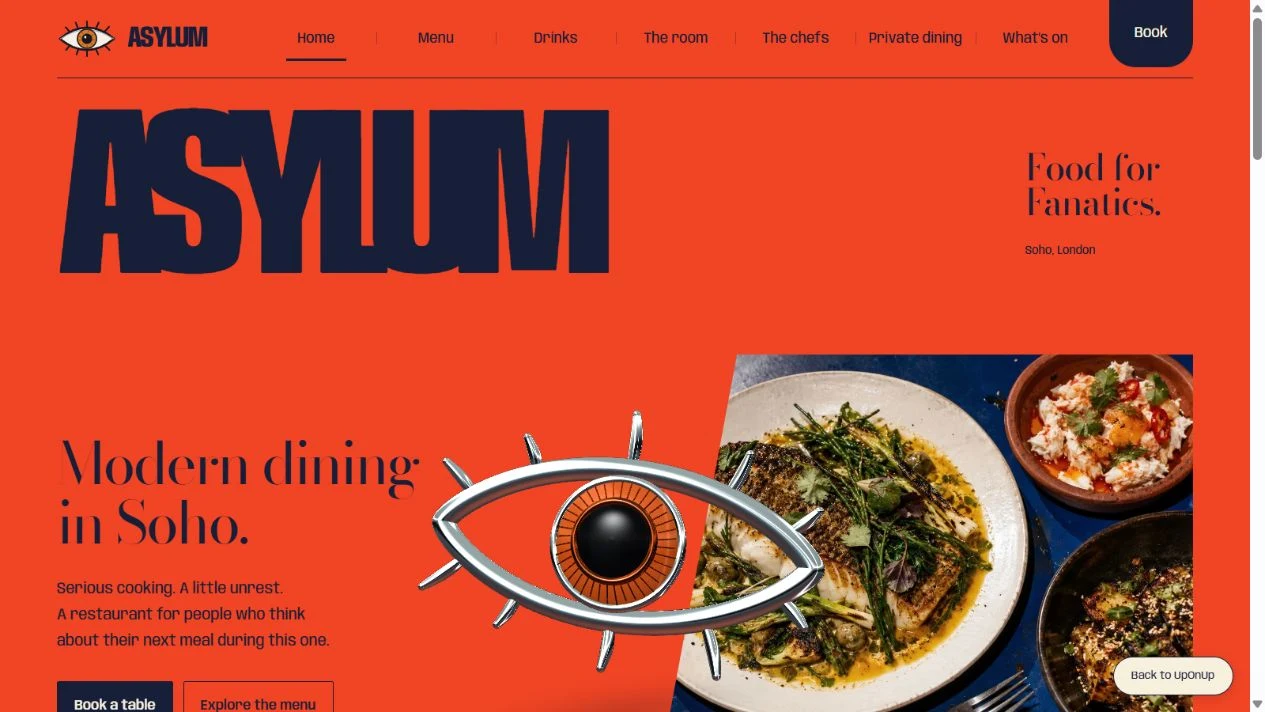
Asylum gets your attention with that orange, the huge lettering and a chrome eye sitting over the food. We carried that slightly unruly character through all eight pages, while keeping the things you came for close to hand: menus, a look around the room and a way to plan your visit.
- Project
- Website design and build
- Website
- 8 working pages
- Created by
- UpOnUp
What this website needed to do.
A restaurant website should give you a feeling for the evening before you arrive. For Asylum, that meant making room for an expressive identity and the food, then making the menu and dining options easy to find.
The decisions behind the design.
Make the menu easy to explore
You should be able to read the menu while deciding where to eat. Here, the dishes have descriptions and prices on the page, with filters to help you browse. The allergy note stays alongside them, because a dietary category cannot promise there is no cross-contact in the kitchen.
Explore the menu in a new tabGive different occasions their own route
Dinner for two and a private gathering need different information. We gave the room, private dining and events their own pages, with group sizes and menu choices where they matter. Choose a private-dining experience and it follows you into the planner, so you don't have to choose it again.
Explore private dining in a new tabCarry the identity across every page
The eye, the heavy wordmark and the bright orange make the opening unmistakably Asylum. The colours and sculptural details change as you move through the site, with the same navigation keeping everything familiar. As you browse the food and drinks, you can slow down and look through each choice.
Explore the drinks page in a new tabPlan the visit and check the details
The planner takes you from the kind of visit you have in mind to a date, party size and preferred time. You can check the details together and download your selection. These are preferences rather than live availability; the preview keeps them on your device without sending a reservation.
Try the reservation planner in a new tabExplore Asylum.
Have a look around. You can open the pages and try the website at desktop and mobile sizes.
The booking planner saves your choices locally. It does not reserve a table or send your details.
How the pages fit together.
Here's what you can explore beyond the homepage.
- Home
- Introduces the food, room and main visitor actions.
- Menu
- Dish descriptions, prices, filters and a tasting-menu option.
- Drinks
- Cocktails, wine and alcohol-free choices.
- The room
- The setting, service times and access questions.
- The chefs
- Team profiles and kitchen identity.
- Private dining
- Group size, menu format and planning questions.
- What's on
- Expandable events linked to relevant visit options.
- Book
- Visit preferences, review and a local download.
What to take into your own website.
The details will be different for your business, but these are useful places to start.
- A readable menu lets someone make a choice while they're out, without opening a separate PDF.
- A group organiser needs different details from a couple choosing dinner. Give private dining and events enough room to explain them.
- For a live restaurant, the final booking step needs a connected, tested reservation provider.
Let's plan your website.
Tell us what you do and what you'd like your website to do better. We'll help work out the pages, write the words and build a design that feels right for the business.