What should go on a restaurant website?
Start with what someone needs to choose the restaurant: a readable menu, a feel for the place, practical visit details and a clear way to arrange a table or ask about a gathering. Give each piece of information an owner, so it stays useful when the menu, hours or plans change.
Let people read what they came for.
A menu is often part of the decision to visit. Put dish names, useful descriptions and confirmed prices in readable page text. If you also offer a download, give it a clear name and make sure someone knows to update both versions.
Separate menus when the offer changes. Lunch, dinner, Sunday lunch and a tasting menu may have different dishes, prices or serving times. Say when each applies rather than expecting a visitor to work it out from a photograph or filename.
On Angelos’s menu page in a new tab, the dishes are grouped into starters, pasta, pizza, fish and the grill, sides and desserts. Sunday lunch has its own route. That gives someone several sensible ways to browse without making them open a different file for every choice.
Use dietary wording your restaurant has checked. The website team should not infer ingredients or kitchen practices from a dish name. Asylum’s menu includes a dietary note explaining that its filters describe choices, rather than guaranteeing the absence of cross-contact.
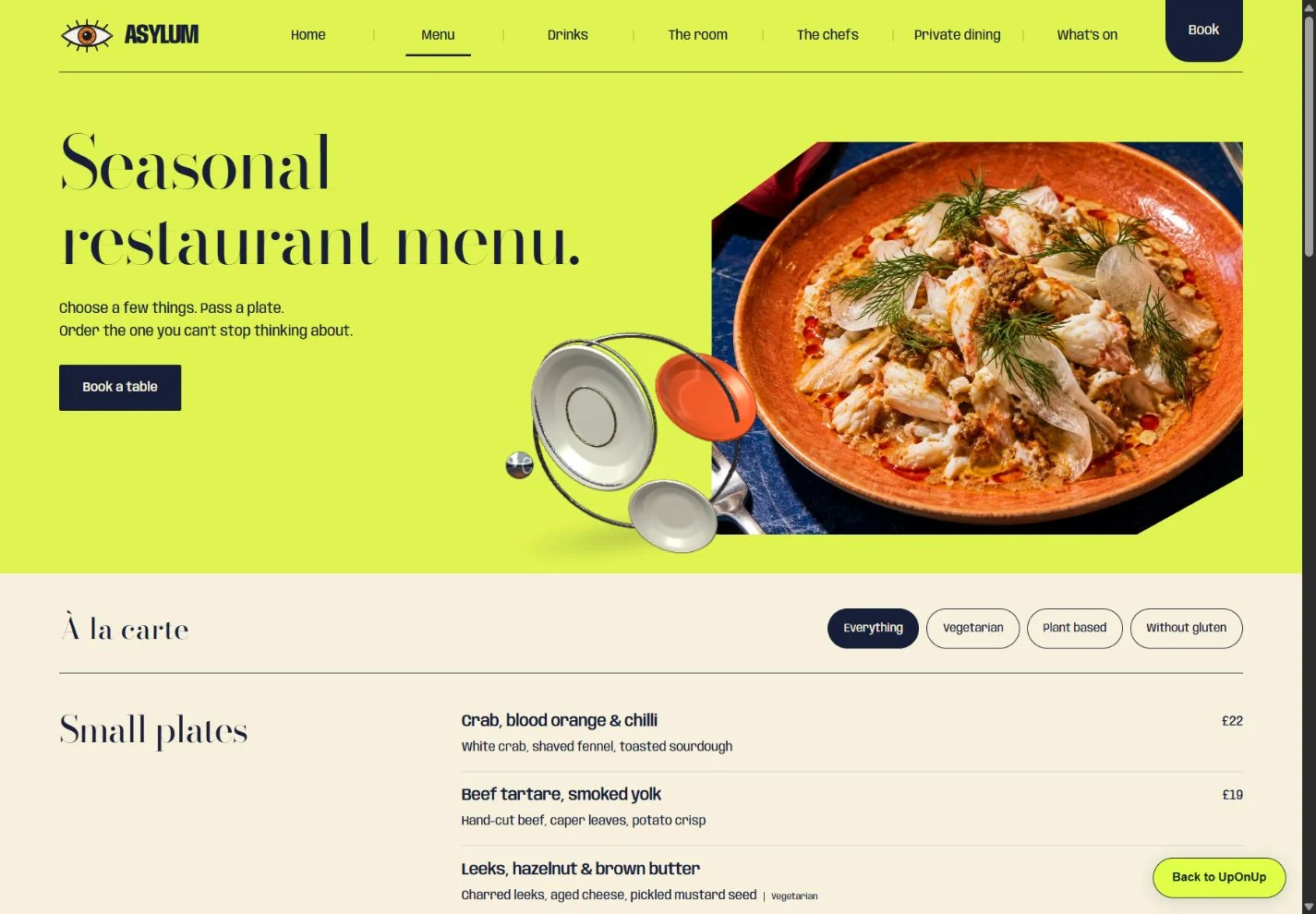
Show what an evening feels like.
The food matters, but so does the room. A visitor may be choosing somewhere for a quiet conversation, a lively dinner or a family celebration. Give them enough to picture it: the dining space, a few dishes that represent the current menu and details that make the restaurant its own.
Choose photographs of your food, room and team that give someone a feel for a visit. Check permission to publish them and add captions where the context helps. If new photography is still being arranged, list the missing shots in the brief so everyone knows what is coming.
You do not need to fill every gap with a paragraph about passion. Explain the particular things that matter: how the food is served, the kind of occasion the space suits, or a choice the kitchen makes. Our website image guide helps organise the files, permissions and captions before design starts.
Make the practical details easy to find.
Bring the confirmed address, contact number and hours together. Distinguish kitchen service from general opening hours where they differ. If you have several venues, connect each one to its own correct menu and next step.
The Angelos visit-page design in a new tab gives kitchen hours a dedicated section, with separate sections for location, travel and access. That structure gives a visitor somewhere clear to look for the practical details.
For your live restaurant, supply the confirmed venue address, verified directions and arrival details before publication. If access, parking or public transport information is uncertain, say what needs confirming and give people a suitable contact route. Avoid broad promises such as “fully accessible” without checking what the restaurant can actually offer.
Give a group organiser something to plan around.
Someone arranging dinner for a group needs more than the ordinary menu. Explain which space they can ask about, the group sizes it suits, how menu choices work and which details remain to be agreed. Include any published starting price only with its actual scope and conditions.
On Asylum’s private-dining page in a new tab, the example separates the private table from a whole-restaurant gathering. The page discusses a shared menu and asks the organiser to think about date, group size and lunch or dinner. Those are useful distinctions to make before someone starts writing an enquiry.
Your restaurant may work differently. Write from its actual arrangements, including what staff need to know and who handles the conversation. The example planner lets visitors explore preferences; it does not make a reservation. Your live booking or group-enquiry connection needs its own agreed arrangement.
Match the invitation to what happens next.
Choose wording after you know the route. “Check availability” can lead to an existing reservation service. “Ask about private dining” should lead to an enquiry. If staff must accept a requested date, explain that before the visitor mistakes a preference for a confirmed table.
Keep the main choices easy to recognise in the navigation. Menu, visit details and the relevant booking or contact route deserve ordinary, descriptive names. Google’s link guidance recommends link text that helps people and search engines understand the destination. W3C’s heading guidance explains how meaningful headings communicate page structure. Neither requires stripping the restaurant of its character.
Decide how the next menu reaches the website.
Agree who supplies changes, who approves the final facts and who publishes them. If the menu changes regularly, discuss the editing arrangement before the build. A website project and an ongoing content service are different commitments.
Keep a short list of where each repeated fact appears. A new Sunday schedule might affect the homepage, menu, visit page and downloadable menu. Give temporary offers a real end date and a person responsible for removing or replacing them. That is easier to manage than remembering every mention when service is about to start.
Bring a useful content pack to the first conversation.
Collect what exists and mark what is still missing. You can use the outline with any designer; you do not need to finish all the writing yourself.
Swipe sideways to see all columns
| Content | Bring or confirm | Name an owner for |
|---|---|---|
| Menus | Current dishes, descriptions, prices, service times and approved dietary wording. | Approving and updating every published version. |
| The restaurant | Useful room, food and team images with permission to publish. | Supplying originals and checking captions. |
| Visiting | Address, hours, contact route and verified practical information. | Checking details and exceptional dates. |
| Groups and events | Available spaces, suitable group sizes, menu arrangements and enquiry requirements. | Confirming the offer and responding. |
| Booking or enquiries | The existing provider or intended staff-managed route. | Confirming the destination and the wording. |
Bring the restaurant. We’ll shape the website.
We bring planning, copywriting, design and development together around the way people will use your site. Your team supplies and approves the restaurant facts. We agree page scope, booking connections and ongoing editing before treating them as part of the job.