Free website brief template.
A clear plan for your designer.

Start with what you know about the business and what you want the website to do. The builder helps you separate what is essential from what can wait, and note anything you still need help deciding. You can send the finished brief to any provider and compare their answers to the same questions.

What is a website brief?

A website brief is the plan you give a designer before they quote or start work. It explains who the site is for, what visitors need to do, what belongs in the first launch and what must keep working. It also records the budget, timing and decisions you still need help with.

Give the designer a useful starting point.

You know the business. The brief gives that knowledge a shape.

The business and the main job

Who should enquire, and what should they do next?

What belongs in the project

What must be ready at launch, and what can wait?

Content, design and what must stay

What can you supply, what do you like, and what already works?

Three groups from the blank brief. Add what you know; keep the unanswered questions visible.

A small cleaning business, as an example.

Here’s how a few specific notes give a designer something useful to work with. This is an illustrative brief; it doesn’t describe a customer project.

Say which enquiries you want.

Help households decide if their regular cleaning needs fit before they ask for a quote.

Regular household cleaning and one-off construction cleaning need different explanations. Naming the work you want is more useful than asking for a modern website.
Separate the first launch from later ideas.

A clear service page, the actual coverage area, an enquiry form and a way to call. Online payments are a possible later project, not part of the first launch.

The provider can price the enquiry website first and explain what taking payments would involve, without treating a future idea as an agreed requirement.

Keep the unknowns in the conversation.

No fixed date yet. The owner will review factual details and approve launch.

Leaving the date open is more useful than guessing one. Naming the owner also makes it clear who will check the facts and approve the finished website.

The Word file is a blank template with the same 18 prompts and supplier questions as the builder. Your online answers stay in the builder; copy, download or print them from the review section below.

Make the brief.
Keep the decisions clear.

Four short sections turn your notes into a project brief, open decisions and questions to ask each supplier. Answer what you know. Use the result with any designer.

No account. No email gate.

Your answers stay in this tab unless you choose to save a draft on this device, download a copy or review an enquiry. Nothing is sent by this tool.

See your brief as you work
See a completed example for a small cleaning business

Fictional illustration. Willow Home Cleaning is invented to show how an owner might answer. It is not a client project or evidence of business results. Viewing it does not change your answers.

WEBSITE PROJECT BRIEF

Use the same brief with any provider. Review the facts before sharing.

THE BUSINESS AND THE MAIN JOB

Your business
Willow Home Cleaning (fictional example). A small team offering regular home cleaning.

The most important improvement
Help households decide if their regular cleaning needs fit before they ask for a quote.

Who should enquire?
Households looking for an ongoing weekly or fortnightly clean, rather than one-off construction cleaning.

What should a visitor do next?
Request a quote

WHAT BELONGS IN THE PROJECT

Services and real coverage
Regular home cleaning. Coverage needs confirming before publication. Construction and hazardous-material cleaning are outside this example scope.

Must be included at launch
A clear service page, the actual coverage area, an enquiry form and a way to call.

Useful later, if budget allows
Online payments are a possible later project, not part of the first launch.

Known pages and connections
Home, regular cleaning, about and contact. Ask the designer if this structure is appropriate.

Questions customers ask
What is included? Do I supply materials? Can you reach my home? What information is needed for a quote?

CONTENT, DESIGN AND WHAT MUST STAY

Starting point
A new website

Words, images and real evidence
The owner needs to supply approved team photographs and confirm the service details. No customer reviews are assumed.

Who prepares the content?
We need the provider to prepare the words

Existing website and things to preserve
Business email must stay working. Domain and email ownership will be confirmed before setup.

Design references
A calm, welcoming page with generous spacing. Put the weekly cleaning list beside an approved team photograph so people can see who may visit their home and what the service includes. Keep the service details easy to read without a moving headline competing for attention. The owner will add reference links and explain the relevant details; no reference site or permission to reuse its images is assumed.

Ownership and handover needs
The business wants control of its domain and a written explanation of hosting, website files and ongoing costs.

TIMING, BUDGET AND APPROVAL

Timing and who approves the work
No fixed date yet. The owner will review factual details and approve launch.

Budget currency
Currency not decided

Budget or budget question
Please separate the first-launch costs from optional later work. No budget is agreed.

OPEN DECISIONS
- Confirm the currency for supplier prices.

QUESTIONS FOR EACH PROVIDER
- What is included at launch, what is optional, and what needs a separate scope?
- What are the full build price, taxes, recurring charges and any minimum commitment?
- Who prepares and approves the words, images and factual claims, and what review is included?
- Who controls the domain, business email, website files and hosting after handover?
- How will you confirm that enquiry delivery, important old URLs and the live website work before and after launch?

BEFORE YOU AGREE
These are the owner’s working notes, not an agreed supplier scope. Blank answers remain open decisions.
No price, availability, page count, ranking result or factual evidence has been inferred. A supplier must confirm the scope and responsibilities in writing.

Prepared with the free UpOnUp brief builder: https://uponup.com/guides/website-design-brief/
Your website project notes

The business and the main job

Start with what you do and the change the website needs to help with.

Name the business and explain the work in a sentence or two.

What matters most? Better-fitting enquiries, clearer services or easier booking, for example.

Describe the customer and the work you would like more of.

Choose the main route. A booking link and a new booking system need different scopes.

What belongs in the project

Separate the essentials from ideas that can wait. You do not need to design the sitemap.

List your main services, where or how you work, and any jobs you do not take on.

Name the few things the first version cannot do without.

Keep nice-to-haves separate so they do not quietly become commitments.

Add supporting detail, if you have it

List any pages, enquiry routes, booking links or other services to connect. Unknown is fine.

What do customers need to understand before they say yes?

Content, design and what must stay

Bring the facts and mark anything still awaiting approval.

This helps keep existing pages, email and access in the conversation.

What can you supply? Mention permissions or factual approvals still needed.

Choose a starting point for the supplier discussion.

Add supporting detail, if you have it

Add the current URL, important pages, domain, business email or integrations. No passwords.

Link to a few examples and explain what you like or dislike.

Who needs access to the domain, finished files, hosting and email? Note questions to settle.

Timing, budget and approval

Leave unknowns open. A useful brief does not need a guessed deadline or price.

Give the real deadline, what drives it and who checks facts and approves launch.

No currency conversion is performed.

Optional. State a range, whether tax is included, or what you need a supplier to price.

This is optional browser storage, not an UpOnUp account or online backup. Other people using this browser may be able to see it. Uncheck to remove the saved copy and keep editing in this tab.

Draft saving is off. Keep a copy before leaving.

Your brief, ready to review.

Check the facts and open decisions. This is your working plan; a supplier still needs to confirm scope and prices.

Your notes will appear here.

Leave passwords, payment details and private customer information out. Each answer can contain up to 2,400 characters. Unknowns stay visible; no facts or prices are generated.

Want UpOnUp to look at the project?

You can carry your project notes into an editable enquiry. Review them before sending. Your complete supplier-question checklist stays in your download.

Working with your team offline? Download the blank Word brief (.docx) or use plain text (.txt).

What makes a brief useful?

You do not need to design the website before speaking to a designer. A few specific notes about the business, the customers and what you want the website to do are far more useful. If you are unsure about something, say so.

One main priority

Say what should be easier for the customer. A cleaner enquiry route, clearer service boundaries and an online booking system are different projects. Give the provider a real first priority. For enquiries, the quote request form guide helps you decide what the first message should ask.

A scope with boundaries

Separate what must be ready at launch from what can wait. Use the small business homepage guide to plan what visitors need to understand first. Include existing pages, email and connections that need to keep working. An unmentioned requirement can become a costly surprise.

Decisions that stay visible

If the budget, timing or content is not settled, say so. Ask the supplier to respond to the gaps instead of treating a blank answer as permission to make assumptions.

Use the cleaning-business example inside the tool to see the level of detail. Your business may need a very different answer. For one service page, the service-page worksheet helps with scope, coverage and the next enquiry step. The image planning guide helps you choose useful, permitted material.

Show the detail you like, then tell us why.

A link with “something like this” leaves a lot open. You might love the photographs while your designer notices the colours. Pick two or three references and name the detail that caught your eye, where it appears and why it would suit your business. A reference can come from a different industry.

For the cleaning business above, a useful note could be: “We like the way this service page puts the weekly cleaning list beside a photograph of the team. People are inviting us into their homes, so we want them to see who we are and understand what a regular visit includes. The generous spacing feels calm; we’d prefer that to lots of competing offers.” Add the actual page link when writing your own version.

You don’t need to choose a font or draw the layout. Explain the feeling you want and give the designer enough context to make their own decisions.

Separate the look from the job.

A booking calendar might look lovely, but needing one changes the work involved. Record colours, photography and layout here; put booking, payments and other functional requirements in the launch scope. If a reference has an interaction you want, describe what the customer should be able to do.

Make dislikes useful too.

“Too busy” becomes easier to act on when you explain that the moving headline made the service details hard to read. Say what bothered you and what you’d rather the customer notice. Keep those observations specific instead of ruling out whole styles.

References show a direction; they don’t give permission to reuse another business’s photographs, words or branding. The website image guide helps you plan material you can use. In Content, design and what must stay, open “Add supporting detail, if you have it” and add your notes under Design references.

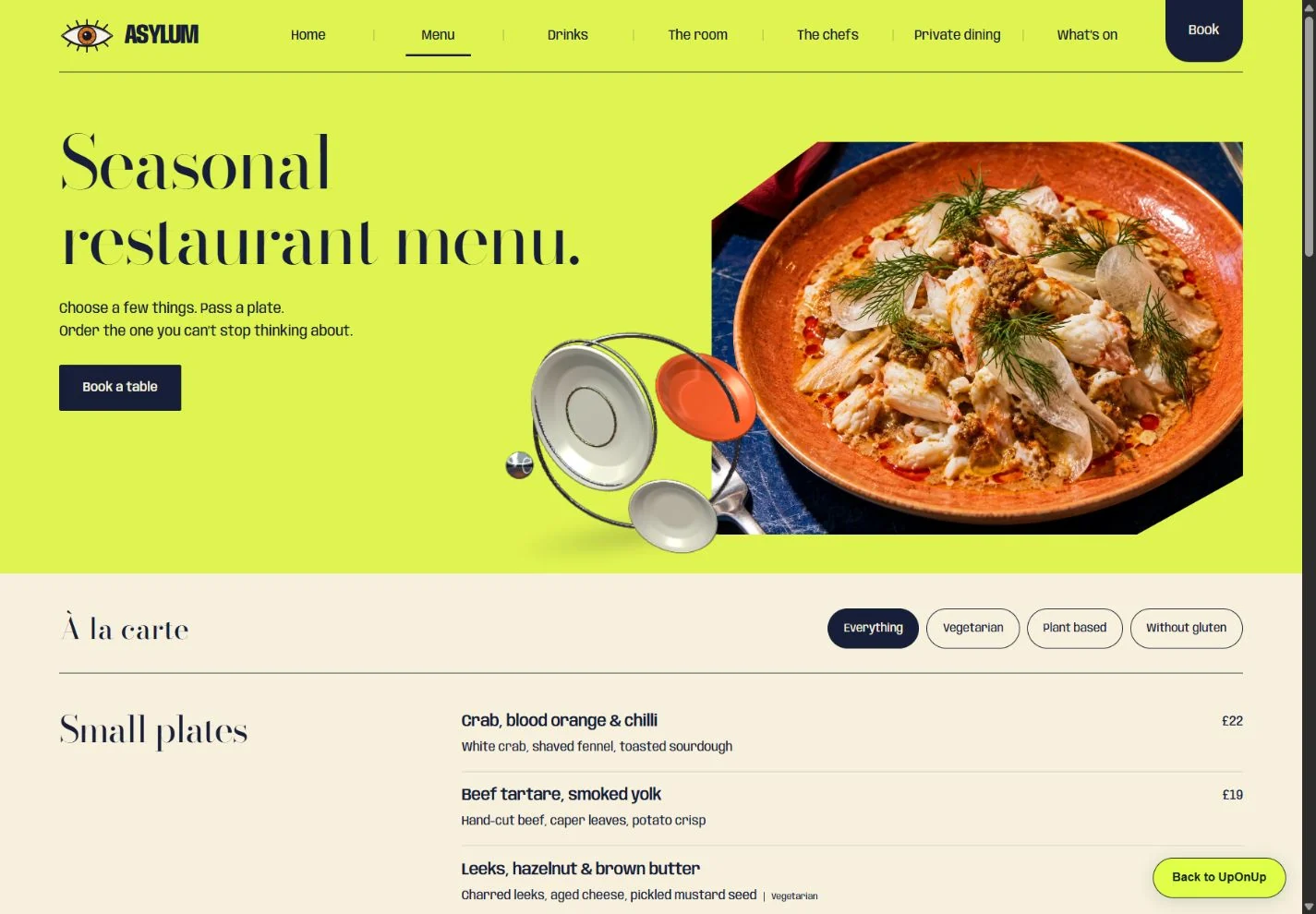
Asylum’s menu page with a lime background, large dish image and readable dish listExplore Asylum’s menu in a new tab

Describe the visual detail.

“We like the confident colour and the space given to the food. Our menu should be just as easy to read.”

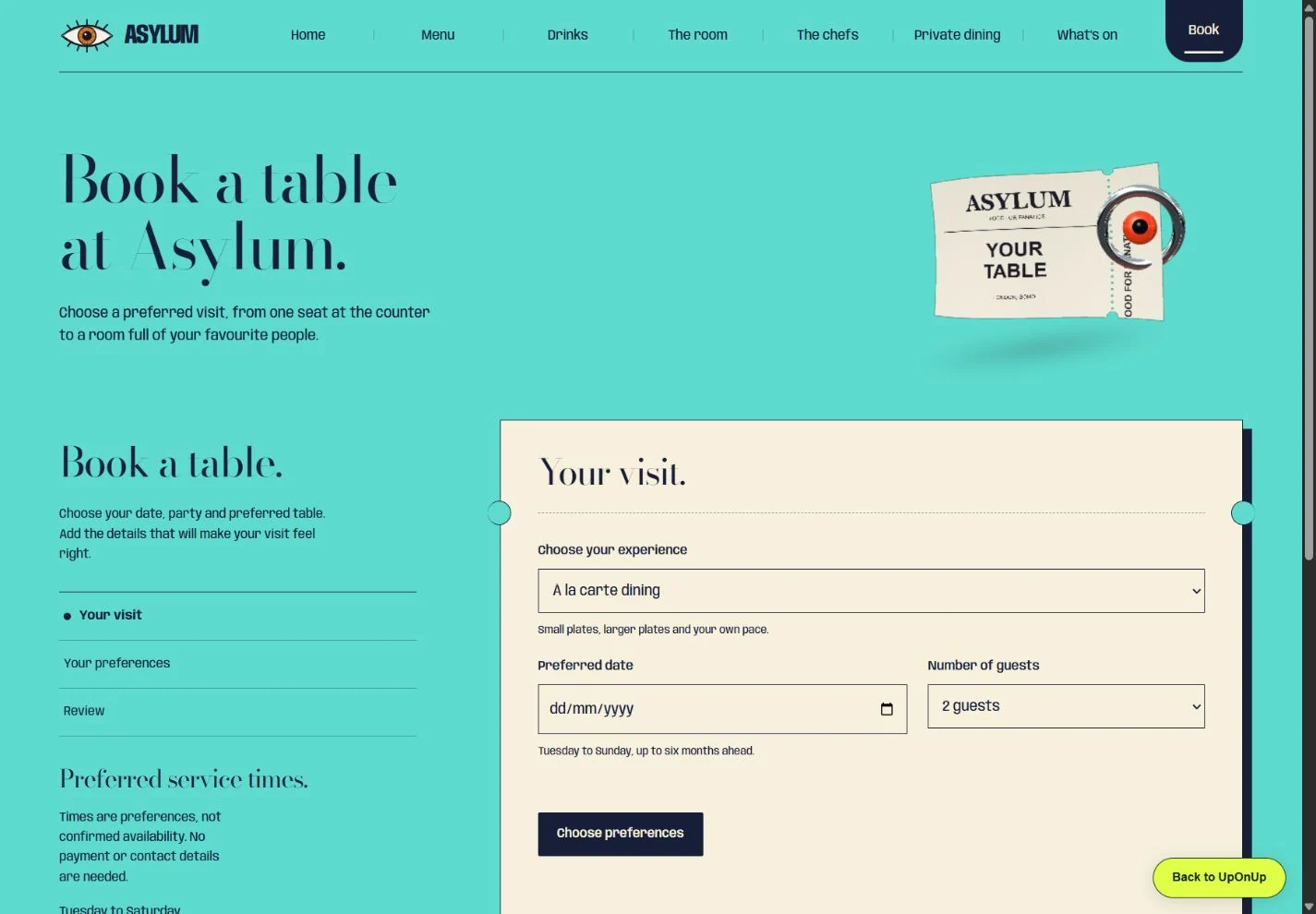
Asylum’s reservation planner with visit, preferences and review stepsExplore the reservation planner in a new tab

Describe the job separately.

“We need people to choose a date and party size. We still need to agree whether this connects to our booking system.”

Two pages from our Asylum website. The example notes separate a design preference from a functional requirement. The planner is an explorable example, not a live booking service.

Send the same brief.
Compare the commitments.

Give each provider the same project notes. Ask them to separate included work, optional items, ongoing costs and responsibilities in writing. A good reply should make the unknowns clearer, not simply repeat your brief back to you.

You do not need to invent a final sitemap or know every technical answer. Use the brief to agree which questions the designer will resolve, which facts you will supply and who approves the work.

Keep the brief’s date or version with each proposal’s reference. When replies arrive on different days, a saved editable comparison on your device lets you reopen the same record and add the next answer.

When you need a more formal brief

If several people must approve the purchase or suppliers need to answer fixed requirements, use the website RFP and requirements pack. It includes requirement IDs, supplier responses and launch responsibilities.

When the work is ready to launch

The launch check record lets you record what was checked, the evidence and unresolved issues. A written brief and a completed build are different milestones.

Want help putting the plan into practice?

We turn those business details into a custom website, bringing the planning, writing, design and build together. You help us get the facts right and approve the result. Send us your brief if you would like to talk it through, or take it to another provider.

Message us