Revenant London mortgage website design
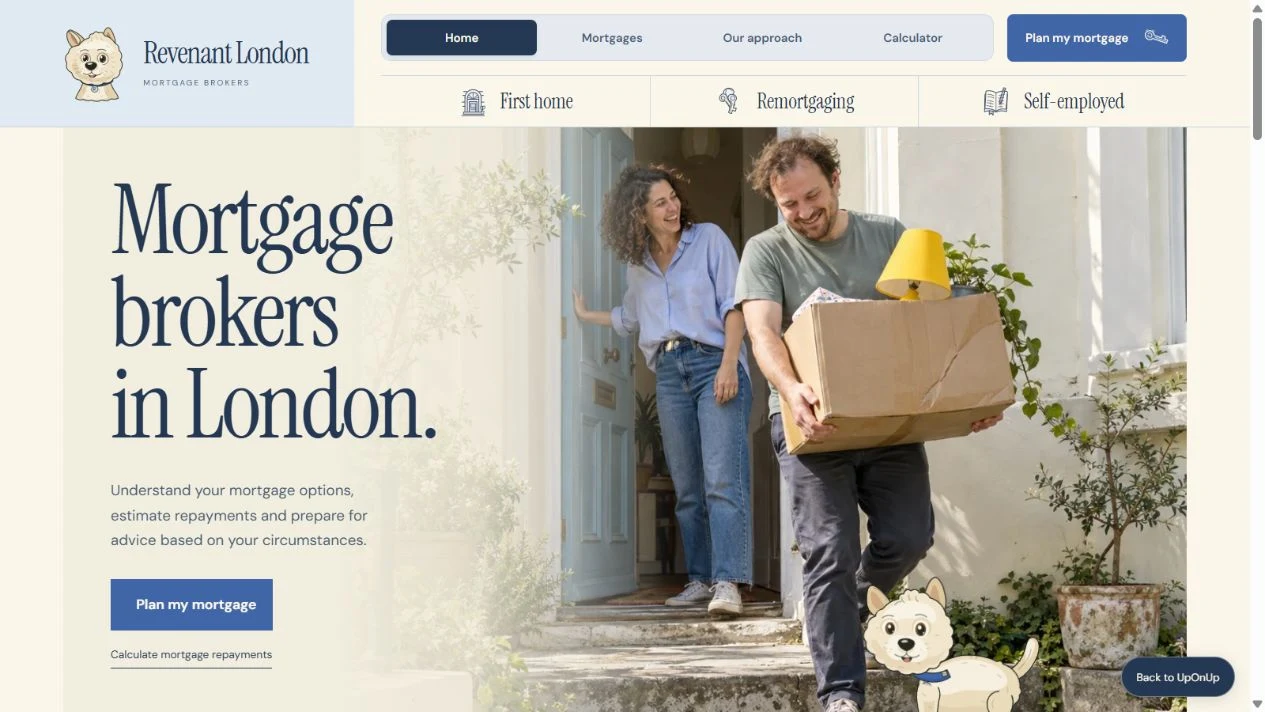
Revenant feels welcoming from the start, with soft blue, cream, hand-drawn details and Monty the dog. The eight pages give first-time buyers, people remortgaging and self-employed visitors different places to begin, with repayment estimates and preparation tools to explore along the way.
- Project
- Website design and build
- Website
- 8 working pages
- Created by
- UpOnUp
What this website needed to do.
Make a complicated subject feel approachable without glossing over the decisions involved. Someone buying a first home needs a different starting point from someone whose current deal is ending, so the pages follow those situations.
The decisions behind the design.
Organise the website around the decision
The first question is where you are in the process. Buying your first home, remortgaging and working for yourself lead to different pages, with the information and preparation that fit each situation. The soft colours and illustrated details keep the explanation feeling approachable as you read.
Explore the mortgage journeys in a new tabMake the calculator's assumptions visible
Change the property price, deposit, interest rate or term and you can see the effect on the estimated repayments and totals. The planning room keeps the assumptions beside the figures. It's an illustrative capital-and-interest estimate, not a check of affordability or which mortgage is suitable.
Explore the planning room in a new tabGive preparation a useful output
It's easier to begin a conversation when you've had a moment to gather your thoughts. The short preparation tool asks about your situation and timing, then makes a checklist and a question to take to an adviser. It needs no personal financial details, and you can save the text file locally.
Try the preparation checklist in a new tabLet the visitor keep a reminder
On the remortgaging page, enter a deal end date and choose how far ahead you'd like a reminder. The tool creates a calendar file you can keep. It's a personal planning reminder, not an application deadline, an advice booking or a message sent to anyone.
Explore the review reminder in a new tabExplore Revenant London.
Have a look around. You can open the pages and try the website at desktop and mobile sizes.
The calculator gives an estimate, not mortgage advice or an affordability assessment. The tools do not submit an application.
How the pages fit together.
Here's what you can explore beyond the homepage.
- Home
- The identity, borrowing situations and main next steps.
- Mortgages
- Different reasons for seeking a mortgage.
- First home
- Deposit, buying costs and preparation questions.
- Remortgaging
- Deal review considerations and a local calendar reminder.
- Self-employed
- Income patterns and preparation context.
- Approach
- An explanation of what happens in a mortgage conversation.
- Planning room
- An illustrative repayment calculator with assumptions.
- Start
- A locally saved mortgage preparation checklist.
What to take into your own website.
The details will be different for your business, but these are useful places to start.
- Start with the person's situation, so a first-time buyer and someone reviewing a deal can find different answers.
- Keep the calculator's assumptions beside its figures, with a clear explanation of what the estimate cannot tell you.
- Before a mortgage firm's site goes live, its reviewer needs to approve the services, disclosures, wording and handling of enquiries.
Let's plan your website.
Tell us what you do and what you'd like your website to do better. We'll help work out the pages, write the words and build a design that feels right for the business.