How to write a website case study
that helps someone choose you.
A good case study explains a particular job: what the customer needed, what you did, why you made those choices and what the finished work shows. It gives a prospective customer something concrete to judge, especially when they have a similar problem.
Choose a project your next customer can recognise.
Your largest job is not automatically your most useful case study. Think about the work you want more of and the questions people ask before commissioning it. A small, awkward garden can tell a more relevant story than an enormous estate if most of your customers have small, awkward gardens.
Look for a project with a clear starting point, a few decisions worth explaining and material you can publish. For a consultant, that might be an agreed process or deliverable. For a trades business, it might be a finished installation and the practical constraints behind it. The reader needs to understand your contribution, including where other people were involved.
A gallery and a case study do different jobs. A gallery helps people browse the range and appearance of your work. A case study gives one project enough space to explain it. You can use both: a short caption in the gallery, with a link to the full story where there is one worth telling.
Have a short conversation before writing a long page.
The person who did the work often has the best details, but may not think of them as marketing material. Ask what made this job different. Was access difficult? Did something have to keep operating? Was the customer choosing between two approaches? Those answers give the page its substance.
Gather the project notes, approved photographs and any result you can substantiate before drafting. Keep questions beside gaps rather than filling them with confident guesses. Our project interview template gives you a starting point for that conversation, including image captions and permission checks.
- What did the customer want to change, and why?
- What was already there, and what needed to remain?
- Which decisions affected the finished result?
- What did your business deliver, and what did others do?
- What can you show now, and what still needs checking?
Ask for the ordinary explanation first. “We made the entrance wider so the equipment could get through” is much more useful than “we delivered an innovative access solution”. You can polish the sentence later without losing the thought behind it.
A practical outline for a project page.
Use the sections that help explain this job. A short project should not need eight headings simply because a template has eight spaces. Keep the most useful facts near the start, so someone can quickly decide whether the rest is relevant.
| Part of the page | What to put there |
|---|---|
| Descriptive title | Name the work and the useful distinction: a courtyard garden, a workshop fit-out or a new enquiry website. Add a place only when it is accurate, permitted and useful. |
| Opening summary | Explain who the work was for in appropriate terms, what they needed and what your business delivered. A few sentences should orient the reader. |
| Starting point | Describe the actual problem and constraints. Include the detail that explains why the project took this shape. |
| Work and decisions | Show what you changed and explain the important choices. Identify your role and any limits to the scope. |
| Finished result | Show the deliverable or completed work. Add measured outcomes only when the evidence supports them. |
| Next step | Link to the relevant service and invite someone with a similar project to tell you what they need. |
You do not need to squeeze every service keyword into the title. “A sheltered courtyard with space for outdoor dining” tells a reader more than a long string of landscaping terms. The page can explain the planting, paving and seating in their proper context.
Let the pictures carry detail, then explain what matters.
A finished photograph can be beautiful without explaining the work behind it. A caption might identify the material, the use of the space or a decision that is hard to spot. Choose a few views with different jobs rather than filling a page with near-identical images.
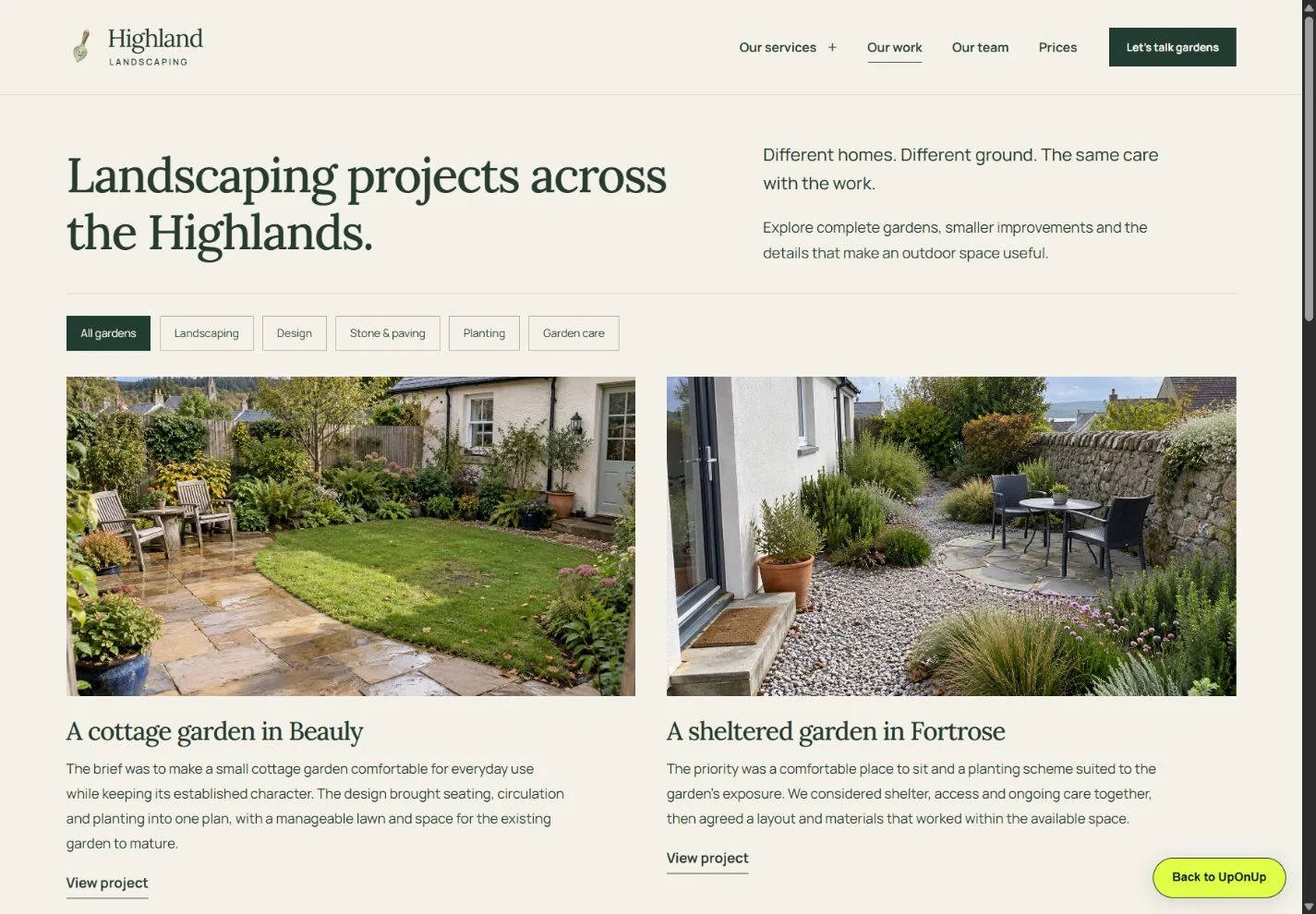
In the Highland Landscaping website we designed, the gallery pairs garden images with notes and lets visitors filter the kind of work they want to see. The useful design choice is that the pictures and explanations stay together. For your own business, the equivalent is your project material and the story of what you actually did.
Before-and-after images are useful when they fairly show the same project and explain the change. Keep the viewpoint understandable and say when photographs show different stages. If an image is a drawing or proposed design, label it accordingly; it should not be mistaken for completed work.
Give informative images descriptive alternative text, and keep the supporting explanation on the page. Google's image guidance recommends placing images near relevant text and using helpful descriptions. Our business website image guide covers the wider collection and preparation process.
A result can be worth showing without an impressive percentage.
Sometimes the result is the finished work itself: a room brought back into use, an agreed set of documents, a website with a readable menu and a clear enquiry route. Explain what can be seen and checked. That is a useful account of the project even if nobody measured a sales increase.
If you do have figures, keep the period, source and comparison alongside them. Say what was measured and avoid attributing every change to your work when other things also changed. An approved customer comment can add another perspective, but keep the wording faithful and make sure it can be published.
For private projects, agree what can be identified before publishing names, photographs, addresses or operational details. A broad description may be enough to explain the work. If you cannot publish meaningful details, choose another project rather than leaving a page full of anonymous praise.
If you’re starting out, an original sample or design study can show how you think. Explain what you set out to make, show the choices you made and let people explore the finished piece. Make the kind of work clear in the title and introduction.
Give the case study a place in the rest of the website.
Link to the page from the service it demonstrates, with a short sentence explaining why it is relevant. A planting service might point to a garden where the planting choice is the story. A restaurant website service might point to the menu and private-dining decisions in a website design study.
The case study should return the favour: help a reader find the service, see related work and make an enquiry. Avoid ending with an unrelated sales pitch. “Planning a similar garden?” is a sensible invitation when the preceding page has shown a garden project and the link goes to the right team.
A descriptive address, a clear title and crawlable internal links help make the page understandable and discoverable. They do not guarantee a ranking. The stronger reason to publish is that you have given a potential customer a useful piece of evidence they could not get from a generic service description.
Review the page when something material changes: the service is no longer offered, a permission changes or you have a meaningful update to the result. Preserve useful project URLs when redesigning the site, and include them in your page inventory and migration plan.
Bring the work you want people to notice.
We can help turn your project notes and approved images into pages that explain the work properly. Send us the website and tell us which projects deserve more attention. If you are still gathering the details, start with the questions above and keep the unknowns visible.