For a website that is already live
Why is your website not getting enquiries?
A quiet inbox can mean too few suitable visitors, a page that leaves people unsure, a difficult contact route, or messages that never reach the right person. Sometimes enquiries arrive but nobody follows them up. Check where the journey stops before paying for more traffic or replacing the website.
If you’d like a hand, send us your website and tell us what enquiries you were hoping for. You don’t need to finish the worksheet before getting in touch.
Start with a working route
Follow one enquiry all the way through.
Before trying to explain a conversion rate, send a test message through the website. Check that it arrives where expected and that someone knows they need to reply. There is little value in changing the page if that basic route is broken. See our own delivery check.
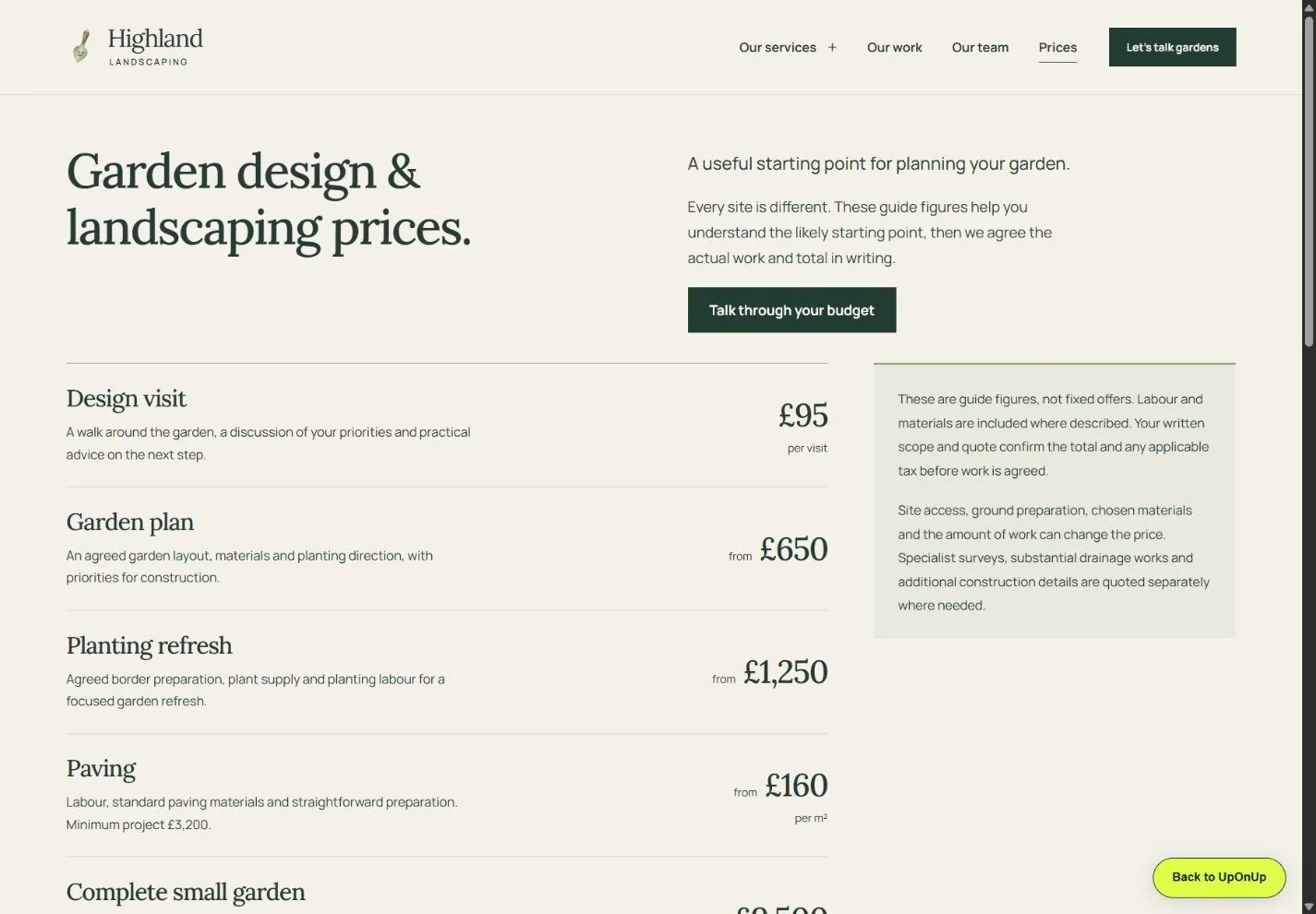
On Highland’s pricing page, a homeowner can see what each service covers and how access, preparation and materials affect a quote. The “Talk through your budget” link leads to an enquiry draft with that topic selected. Try that route and think about the question your own page needs to answer.
Try the pricing page and its next step- Find the right page
Start where a customer would arrive. Does the page answer the need behind the search or recommendation?
- Finish the enquiry
On a phone, follow the visible next step. Keep an alternative contact route available if a chat widget cannot open.
- Receive and reply
Trace a labelled test to the intended inbox or dashboard, then check who will respond. The thank-you screen is only one step.
No analytics access? You can still test the route, inspect the page and check your own enquiry record. Mark discovery as unknown until you have reliable data. A short period with few visits cannot establish a design failure.
A private working sheet
Record what you find.
Choose a result for each check and add your observations or questions. Entries are saved in this browser and are not sent to UpOnUp. Keep customer details out.
Does a test enquiry arrive?
Send a clearly labelled test through the live contact route. Check the intended inbox and any form or booking dashboard. Record the time and where the message arrived. A thank-you screen alone does not prove delivery.
Up to 420 characters. Longer text stays editable; shorten it before saving or exporting.
Can someone reach that route on a phone?
Start on a page a customer might land on. Ask someone unfamiliar with the business to find the relevant service, understand the next step and open the contact route on a phone. Record where they stopped, if anywhere.
Up to 420 characters. Longer text stays editable; shorten it before saving or exporting.
Are the right people reaching this page?
Check the page and query views in Search Console for a stated date range. Compare them with your own enquiry record and any site analytics. Search Console shows Google Search activity, not every website visit or every lead.
Up to 420 characters. Longer text stays editable; shorten it before saving or exporting.
Does the page settle the buyer’s next question?
Read the page as a first-time customer. Can you tell what the business does, who it helps, what happens next and which evidence supports its claims? Record the exact missing answer, not a general impression.
Up to 420 characters. Longer text stays editable; shorten it before saving or exporting.
Does a received enquiry get handled?
Trace one permissioned or test enquiry from receipt to reply. Check who owns the inbox, whether replies can be sent, and whether an out-of-hours message has a sensible next step. Do not put a customer’s private details in this worksheet.
Up to 420 characters. Longer text stays editable; shorten it before saving or exporting.
Your entries stay on this device.
For Google Search, its Performance report can be viewed by query, page, device and date. Clicks and impressions are search signals, not a count of all visits or enquiries. Record the date range and do not infer a trend from a single small sample.
Your next move
Choose a useful next check.
The report suggests a next check from your selections and notes; it does not inspect the website. Confirm that a labelled test reaches the intended person, then record the agreed action and retest below.
UpOnUp / Website enquiry diagnostic
Start with a live test enquiry.
Check whether a message reaches the intended inbox before diagnosing page performance.
See the delivery checkSelected concerns with notes
- No concern with a note selected.
Selected concerns without notes
- No concern without a note selected.
Still to verify
- Message delivery and the rest of the visitor journey.
Initial check record
No page or period entered yet.
- Run the checks above and record what you observed.
Copy or download your findings and action record. Review it before sharing.
After making a fix, try the same steps again and check whether the message arrives and gets a reply. If everything works but a relevant visitor still hesitates, find out what they are unsure about and improve that part of the page. Any claim about better results still needs measured evidence and permission to publish it.
A delivery check on our own website.
On 28 September 2026, we were checking UpOnUp’s referral form. The old external form route showed a thank-you page, but we could not find the test messages in the intended mailbox. We never established why those emails were missing.
We replaced that route with an on-site system that saves the enquiry before showing a reference. It then sends an email notification, with a saved copy we can recover if the email needs attention. Visitors could also finish on our website, without the external form page and CAPTCHA step.
Once the replacement was live, we sent a test through the public contact form. We found the saved enquiry, checked that the email had been sent and opened the matching message in our Google Workspace Inbox. The reference and message matched what we had entered.
The labelled internal test let us follow one message all the way from the form to the inbox. It is a check worth repeating after changes.
What to ask your provider to show you
- The visitor’s result. What appears after a successful submission, and what happens if it fails?
- The recoverable message. Where is it recorded, who can access it and how can they find the same enquiry again?
- The actual receipt. Does the intended person receive the labelled message, with enough information to reply?
Use the same test reference across the checks. If a message is saved but an email is missing, investigate the notification before asking the visitor to repeat everything. Agree who checks failures and who handles the reply; an inbox that nobody watches can still leave an enquiry unanswered.
The website launch checklist helps you keep those checks in the release record.
A first-hand UpOnUp test
Our chat route needed a way through.
We tested what happens when the site’s chat widget cannot open. In a local build with the widget URL deliberately made unavailable, the first click reached the contact form after a six-second fallback and the form was visible. In a separate local check with the normal widget URL, the consent and chat panel opened.
The fix was included in a production deployment. These checks covered opening chat and reaching the contact form; inbox receipt is a separate check.
Run the separate launch checksWidget URL deliberately unavailable in a local build.
First click reached the form after the six-second fallback.
Check receipt in the intended inbox and who will reply.
Work from the finding
Use the guide for the actual gap.
If you have a broken path, repair and retest it. If the route works, use the evidence to decide whether discovery, the page answer or follow-up needs attention.
If the design and page explanation are the problem, request a free homepage design to see a possible direction. We email the design with no obligation to buy; a full build is separate. A new design alone will not fix a lack of relevant visitors or a broken enquiry service.